
Insurance Agency CRM Implementation: An Eight-Step Roadmap for Success
Key Takeaways:
- Salesforce AppExchange development is a product business, with commercial, technical, security, and operational commitments at every stage.
- Map insurance workflows before configuring the CRM, from lead intake and quoting through policy servicing, renewals, and cross-selling.
- Treat data migration as a data-quality exercise, with auditing, cleansing, deduplication, mapping, testing, migration, and validation.
- Integrate the CRM with the agency’s existing insurance ecosystem, including the AMS, carrier systems, quoting platforms, document management, and communication tools.
- Automate high-value insurance workflows such as lead routing, quote follow-ups, renewal activities, service escalations, and cross-sell opportunities.
- Measure adoption and business impact after go-live, using metrics such as renewal retention, lead-to-policy conversion, account rounding, revenue per producer, and service efficiency.
Insurance agencies manage relationships across a complex policy lifecycle. A single customer record can span leads, quotes, policies, endorsements, claims inquiries, renewals, cross-sell opportunities, producer relationships, service requests, and years of communication history. Getting insurance agency CRM implementation right means bringing that history together in one place without disrupting the systems that already run the agency.
When this information sits across an agency management system (AMS), policy administration platforms, email, spreadsheets, quoting tools, and other applications, producers and service teams can struggle to get a complete view of the customer. Follow-ups slip, renewals get worked late, duplicate records multiply, and pipeline visibility suffers.
Retention pressure is rising at the same time. JD Power’s 2025 US Insurance Digital Experience Study[1] found 47% of auto and home insurance policies are now purchased through digital channels, and JD Power links heavy comparison shopping among existing customers to falling premiums. For an agency, every renewal is now a moment when a client may be quoting elsewhere.
An insurance agency CRM can connect these customer-facing activities. However, successful insurance agency CRM implementation requires more than configuring software and importing contacts. The CRM has to fit the agency’s distribution model, producer workflows, renewal processes, service operations, data architecture, and existing insurance technology stack.

What Is Insurance CRM Implementation?
Insurance CRM implementation is the process of configuring, integrating, deploying, and operationalizing a CRM around an agency’s specific sales, service, marketing, and policyholder engagement processes.
For an insurance agency, this typically includes:
- Defining business and producer requirements
- Mapping lead, quote, policy, service, and renewal workflows
- Establishing stakeholders’ roles, permissions, and governance
- Cleaning and migrating customer and policy-related data
- Connecting the CRM with the AMS and other insurance systems
- Configuring insurance-specific workflows and automation
- Training producers, account managers, service teams, and other users
- Testing, launching, and measuring adoption, operational efficiency, and business outcomes
Many AMS platforms include basic CRM features. When an agency adds a dedicated CRM, however, it typically works as an engagement layer that sits alongside the agency management system rather than replacing it. The AMS and carrier systems continue to hold policy, billing, and claims records. The CRM gives producers and service teams one place to manage prospects, follow-ups, renewals, and customer conversations.
That distinction matters when developing a CRM implementation strategy for insurance. The goal is to create a connected customer and producer experience without disrupting the systems that run core insurance operations.
“Insurance companies have invested billions of dollars toward digital modernization, but their customers don’t see it. Most investments are internal, and many companies often struggle to convert them into a better business experience for agents, brokers, stakeholders, and customers.”
– Subhasis Mukherjee, Senior Principal at Datos Insights
What Are the Eight Steps in an Insurance Agency CRM Implementation?
The roadmap moves from planning to build to adoption. Steps 1 to 3 define what the CRM must do and who owns it. Steps 4 to 6 prepare the data, connect the systems, and configure workflows. Steps 7 and 8 drive adoption and keep the CRM improving after launch. Some steps run in parallel in practice, but rushing the early ones usually causes rework later.
1. Define Business Goals and CRM Requirements
The first step in CRM implementation for insurance agencies is to define what the agency expects the CRM to improve.
A CRM project should begin with measurable business outcomes rather than a list of software features. Typical goals include:
- Increasing qualified lead conversion
- Reducing lead response time
- Raising producer follow-up completion
- Improving renewal retention
- Growing cross-sell and account rounding
- Improving visibility into the sales pipeline
- Reducing manual administrative work
- Shortening customer service response times
- Increasing data completeness
- Improve reporting across producers, lines of business, and locations
Next, translate each goal into insurance-specific CRM requirements. For example, if renewal retention is a priority, the requirements should cover renewal-date visibility, automated reminders, producer assignments, account reviews, follow-up tasks, and escalation rules. If cross-selling is a priority, the CRM should support household or account-level policy visibility and rules that identify coverage gaps or relevant products.
The same principle applies to lead management. Requirements should define how leads enter the agency, how they are qualified, which producer receives them, how quickly the producer must respond, and when unworked opportunities should be escalated.
Finally, record current values for each goal before configuration begins, such as today’s lead response time or renewal retention rate. Together, the goals, requirements, and baselines form the agency’s CRM implementation strategy for insurance, and they give leadership a clear standard for judging whether the rollout delivers the expected value.
2. Map Existing Insurance Workflows
Before configuring anything, document how the agency actually works today. Start with the core customer journey:
Lead → Qualification → Submission → Quote/Proposal → Bind → Policy Servicing → Renewal → Account Rounding
Each stage involves distinct activities and information requirements. During lead qualification, for example, the agency needs to capture the prospect’s insurance requirements, line of business, location, and eligibility, then assign the lead to the appropriate producer. During submission and quoting, the team may need to collect underwriting information, coordinate with carriers, track outstanding documents, and follow up on pending quotes. Once coverage is bound, the workflow shifts to policy documentation, client communication, and servicing requests.
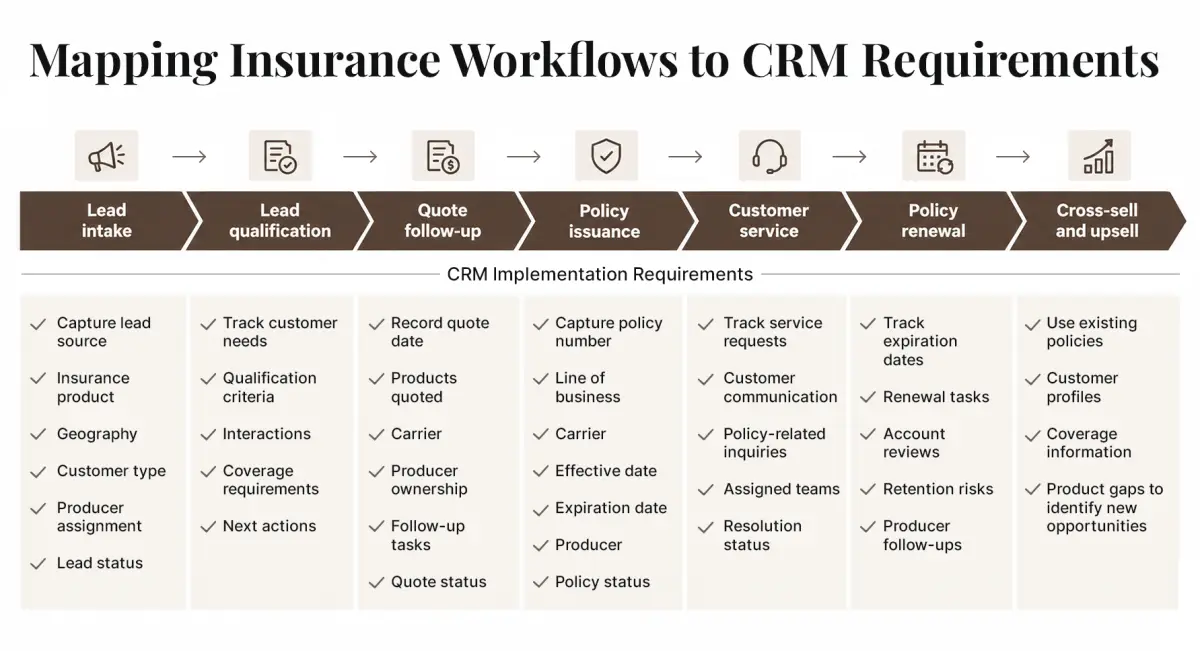
In addition to the core customer journey, map the supporting workflows that facilitate lead management, customer communication, and coordination across teams. These include:
- Lead assignment by territory, producer, line of business, or specialization
- Producer prospecting and follow-up
- Producer-to-service-team handoffs
- Policy anniversary and other scheduled communications
- New customer onboarding
- Claims-related customer inquiries
- Marketing campaign follow-up
- Referral management
As you document each workflow, mark every step as keep, fix, or automate. This turns the workflow map into a blueprint for configuration, automation, integrations, and user training.
It also prevents an agency from simply reproducing inefficient legacy processes inside a new CRM.
3. Build a Stakeholder and Governance Plan
An insurance CRM touches every customer-facing team, so implementation ownership cannot sit exclusively with IT.
A practical governance structure should include representatives from:
| Stakeholder | Responsibility in the Implementation |
|---|---|
| Agency leadership | Owns business outcomes, budget, and priority decisions |
| Sales managers | Set pipeline stages, lead assignment rules, and producer activity reporting |
| Producers and agents | Validate lead, opportunity, account, and renewal workflows |
| Account managers and customer service | Define service, endorsement, and customer communication requirements |
| Marketing | Sets segmentation, campaign, and lead-nurturing requirements |
| Operations | Aligns CRM workflows with agency procedures and the AMS |
| IT | Oversees integrations, security, environments, and technical architecture |
| Compliance, legal, or designated risk personnel | Reviews data handling, consent, retention, audit requirements, and applicable regulatory obligations |
| Data, analytics, or reporting teams | Defines data standards, reporting logic, KPI calculations, and dashboard requirements |
Next, settle three decision rights before configuration begins:
- Who owns the CRM: Name one executive sponsor accountable for outcomes and one CRM administrator responsible for day-to-day configuration, user access, and data quality.
- Who approves changes: Route requests for new fields, workflows, automations, and integrations through a small steering group of leadership, a sales manager, a service lead, IT, and compliance. That group reviews changes on a fixed cadence.
- Who monitors adoption: The CRM administrator publishes adoption and data-quality reports. Sales and service managers act on them with their teams, and leadership tracks the trend against the baselines set in Step 1.
In smaller agencies, one person may hold several of these roles. That works as long as each responsibility is written down and someone is accountable for it.
Compliance review should cover the rules that apply to the agency’s states and lines of business, such as state insurance data security laws (many modeled on the NAIC Insurance Data Security Model Law), privacy obligations, and TCPA consent rules for automated calls and texts. Settling these early prevents rework when automation is configured in Step 6.
Governance matters most after launch. Without clear ownership, agencies accumulate inconsistent fields, duplicate workflows, uncontrolled customization, and conflicting business rules.
4. Clean, Map, and Migrate Insurance Data
Treat insurance CRM migration as a data-quality project, not a simple export-and-import exercise.
Agency data typically sits across an AMS, a legacy CRM, spreadsheets, email systems, marketing platforms, producer databases, and other applications. Depending on the CRM’s scope, the migration may include:
- Customer and household records
- Commercial account information
- Policy details, including line of business, carrier, premium, and effective and expiration dates
- Policy effective and expiration dates
- Producer and carrier relationships
- Lead and opportunity records
- Communication history, notes, and activities
- Renewal history
- Customer preferences
- Service interactions
The recommended sequence is: Before moving anything, decide what the CRM will own and what it will read from other systems. In most agencies, the AMS remains the system of record for policy data. Policy details change through endorsements and renewals, so they are usually better synced through an integration (Step 5) than copied in once, because a one-time copy starts going stale the day after go-live. Agree as well on how many years of activity history are worth migrating.
Then work through seven stages:
Audit → Clean → Deduplicate → Map → Test → Migrate → Validate
- Audit: Identify what data exists, where it resides, who owns it, and whether it is still required.
- Clean: Remove obsolete records, standardize formats, correct incomplete values.
- Deduplicate: Merge duplicate contacts, households, and accounts, and resolve conflicting policy or producer information. Agree on matching rules in advance so producers accept which record survives.
- Map: Match source fields to the CRM data model and define the relationships it must preserve. A household or commercial account links to its contacts and policies. Each policy links to a line of business, carrier, producer, and renewal. Each opportunity links to an account and an owning producer.
- Test: Run trial migrations with representative data. Check record counts, field mappings, relationships, dates, ownership, historical activities, and permissions.
- Migrate: Plan the production cutover with a short data freeze or a final delta load so that records created during the move are not lost.
- Validate: Reconcile after go-live. A record appearing in the CRM does not mean it migrated correctly. Confirm that key relationships and fields work in real producer and service workflows, such as pulling up a household’s full policy list before a renewal call.
Agencies should also incorporate data security and regulatory requirements into the migration plan. EY’s[2] recent insurance GenAI research highlights data privacy, quality, security, and legacy integration as major barriers to technology implementation, reinforcing why data preparation and architecture need to be addressed early.
5. Integrate the CRM With Existing Insurance Systems
A CRM becomes considerably more useful when producers and service teams can access relevant information without repeatedly switching between disconnected systems.
Design insurance CRM integration around the agency’s existing technology stack, and give every connection a defined business purpose.
Depending on the agency’s operating model, integrations may include:
- Agency Management System (AMS): Customer, account, policy, producer, and activity information. For most agencies, this is the most important integration.
- Carrier systems: Policy downloads, endorsements, billing, and claims status, usually received through the AMS via carrier download feeds built on ACORD data standards. Agencies with their own policy administration system, such as MGAs or carrier-owned agencies, may connect to it directly.
- Email and calendar: Customer communications, meetings, reminders, and follow-ups
- Marketing automation: Campaigns, segmentation, lead nurturing, and engagement activity
- Rating and quoting systems: Quote information and lead-to-quote workflows
- Document management: Policy documents, correspondence, forms, and other records
- Customer portals: Self-service requests, customer communications, and digital engagement
- Phone and text messaging: Call logging, text conversations, and consent records
For each integration, settle three questions before building it:
- Agency Management System (AMS): Customer, account, policy, producer, and activity information. For most agencies, this is the most important integration.
- Direction: Does data flow one way into the CRM, or both ways?
- Timing: Does it need to sync in real time, or is a scheduled sync enough?
- Ownership: Which system wins when the same field differs? Follow the system-of-record decisions made in Step 4.
For example, if renewal retention is a priority, the CRM should receive reliable policy expiration information from the relevant system so that renewal workflows can begin at the right time. If lead conversion is a priority, producers should be able to access quote activity without duplicate data entry.
Legacy integration deserves particular attention. Capgemini’s 2025 World Life Insurance Report[3], based on research with life insurance executives, found that 52% of insurers identified outdated technology as a major obstacle, while fewer insurers had progressed from point automation to enterprise-level process redesign and integrated ecosystems.
A well-designed insurance CRM integration architecture should therefore preserve the role of core insurance systems while making customer-facing information easier to access and act on. Most modern connections run through APIs. Where a legacy system has no usable API, middleware or scheduled file exchanges can fill the gap, but they need monitoring so that failed syncs are caught before producers notice missing data.
Tie each integration to a goal from Step 1. If renewal retention is the priority, the CRM needs reliable expiration dates from the AMS so renewal workflows start on time. If lead conversion is the priority, producers should see quote activity in the CRM without re-keying it.
Done well, insurance CRM integration leaves the AMS and carrier systems in charge of policy records while giving producers and service teams one place to see and act on customer information. For a closer look at how a CRM fits alongside the AMS and other core systems, see our insurance CRM evaluation guide.
6. Configure Automation and Insurance-Specific Workflows
Design automation around actual insurance processes rather than generic CRM triggers. The workflow map from Step 2 shows where to start: every step marked “automate” is a candidate.
| Workflow | Trigger | Automated Action |
|---|---|---|
| Lead routing | A new inquiry arrives from the website, a referral, or a campaign | Assign it to a producer by geography, line of business, specialization, or workload |
| Follow-up reminders | A lead is assigned, a quote is sent, or an account review is completed | Create a dated follow-up task for the owning producer |
| Renewal notifications | A long-term policy, such as life coverage, reaches its anniversary, or an annual policy reaches mid-term | Schedule a coverage review and a customer touchpoint |
| Policy anniversary reminders | A long-term policy, such as life coverage, reaches its anniversary, or an annual policy reaches mid-term | Schedule a coverage review and a customer touchpoint |
| Customer onboarding | A new policy is bound | Send welcome communications, request documents, set up the account, and hand off to the service team |
| Cross-sell opportunities | An account review flags a coverage gap, such as a household with auto coverage but no umbrella policy | Create an opportunity for the producer and record whether the customer accepted or declined |
| Task assignment | A service or endorsement request comes in | Route it to the right account manager or service team |
| Email automation | A lead enters a nurture segment, a renewal approaches, or an appointment is booked | Send an approved template to contacts with valid consent |
| Escalations | A lead is not contacted within the agreed response time, a high-priority request stays open, or a renewal task is overdue | Notify the responsible manager |
Two safeguards belong in every automated workflow. First, check consent before any automated email or text goes out, using the consent records migrated in Step 4. Second, record declined coverage offers. A documented declination gives the agency a clear record if a coverage question turns into an errors and omissions (E&O) dispute.
Introduce automation in controlled stages. Start with high-volume, rules-based processes where the expected business outcome is clear. Then expand automation after the agency has validated data quality, workflow performance, and user adoption.
This approach also creates a stronger foundation for AI-enabled capabilities. Lead scoring, renewal-risk prediction, and next-best-action prompts work far better on top of workflows that already run reliably. See how an AI-powered CRM for insurance builds on this foundation.
“AI is a step up from just prompting agents to answer queries. AI can be trained to understand sentiment, empathize with the customer situation, then guide agents to the most relevant, personalized offers — all of which could be done in real time”
– Ilanit Adesman, Partner, Head of Insurance and Fintech KPMG Israel
7. Train Users and Drive CRM Adoption
A technically successful deployment can still fail if producers and service teams do not consistently use the CRM.
Adoption needs its own plan, starting with role-based training. Each group should learn the CRM through the tasks it performs every day, ideally in a sandbox loaded with realistic data from its own book of business.
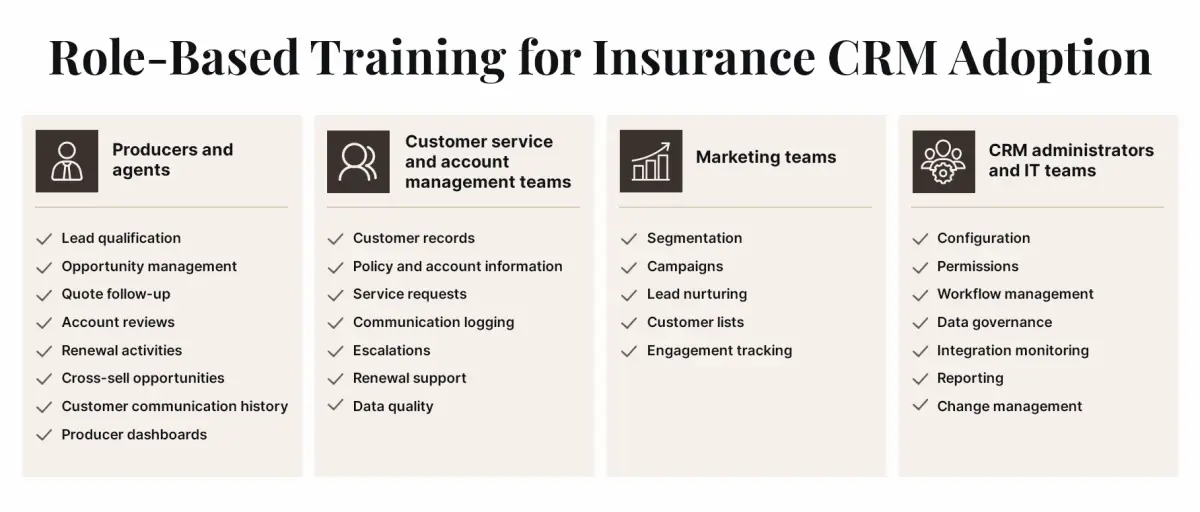
Training alone rarely changes habits. A practical insurance CRM adoption strategy also draws on a few CRM implementation best practices:
- Start with a pilot group: Roll out to a small group of producers and service staff first, fix what they find, then expand.
- Appoint CRM champions: Choose respected users from each team to support peers, surface workflow problems, and feed structured input back to the steering group from Step 3.
- Provide quick references: Short process guides and one-page job aids usually get more use than long manuals.
- Run meetings from the CRM: When managers hold pipeline reviews and renewal meetings using CRM dashboards, keeping records current becomes part of the job rather than an extra task.
- Close the feedback loop: Hold regular feedback sessions, act on what users report, and tell them what changed as a result.
- Schedule refresher training: Revisit training a few weeks after launch and whenever workflows change.
Measure adoption by what people do in the system, not by training attendance. Useful signals include active users by role, activities logged per producer, tasks completed on time, opportunities with current pipeline stages, and the share of records with complete key fields. Track these on an adoption dashboard and review them against the baselines set in Step 1.
8. Launch, Measure, and Continuously Optimize
Go-live is a milestone, not the finish line. Plan a short stabilization period after launch, with the project team, CRM administrator, and champions on hand to fix data issues, broken automations, and integration errors quickly. Agencies with complex operations often launch in phases, as outlined in the timeline section below.
Once the CRM is stable, judge return on investment by comparing business results against the full cost of the program, including licenses, implementation and integration work, training, and ongoing administration. Pair operational metrics, which move within weeks, with financial outcomes, which can take a full renewal cycle to show.
| KPI | Why You Should Track It |
|---|---|
| Book retention rate | Measures the agency’s ability to retain revenue-generating accounts |
| Renewal retention rate | Measures success in retaining expiring business |
| New business revenue | Measures incremental commission/revenue generated through new accounts |
| Submission-to-bind ratio | Measures sales effectiveness, particularly for commercial P&C |
| Lead-to-bind conversion | Measures conversion efficiency for lead-driven business |
| Revenue per producer | Measures producer productivity and book economics |
| Account rounding rate | Measures success in placing additional lines of business with existing clients |
| Cross-sell rate | Measures expansion of existing accounts |
| Lead response time | Measures speed of engagement with new opportunities |
| CRM adoption rate | Measures whether producers and service teams are actually using the platform |
| Data completeness | Measures whether CRM records are sufficiently reliable for reporting and automation |
| Renewal pipeline coverage | Measures visibility into upcoming expirations and renewal workload |
Review adoption, response times, and follow-up completion weekly or every other week in the first months after launch. Review retention, revenue, and account rounding monthly or quarterly. Use what the numbers show to set improvement priorities.
Read the metrics together. If lead response time improves but lead-to-bind conversion stays flat, review qualification rules, quoting processes, and follow-up quality. If producer adoption is low, look for workflow friction before assuming resistance. Producers may be asked to re-enter data that already exists in the AMS, integrations may be incomplete, or dashboards may not reflect how they actually sell.
Optimization continues as the agency adds products, carriers, distribution channels, and automation. Route each change through the governance process from Step 3 so the CRM keeps improving without accumulating clutter.
How Long Does Insurance CRM Implementation Take?
There is no universal insurance CRM implementation timeline. The duration depends on agency size, number of users, data quality, integrations, customization, legacy systems, regulatory requirements, and whether the rollout is phased.
A practical implementation sequence looks like this:
| Implementation Phase | Typical Activities |
|---|---|
| Planning | Define business goals, CRM requirements, stakeholders, and governance structure |
| Data preparation | Audit, cleanse, deduplicate, and map customer, policy, producer, and lead data |
| CRM configuration | Configure insurance-specific fields, workflows, dashboards, roles, and permissions |
| System integration | Connect the CRM with the AMS, policy systems, claims platforms, email, quoting tools, and APIs |
| Testing | Validate migrated data, test workflows, integrations, permissions, and user journeys |
| Training | Conduct role-based training, sandbox testing, user acceptance testing, and feedback sessions |
| Go-live | Deploy the CRM through a phased or full rollout and resolve initial issues |
| Optimization | Monitor KPIs and adoption, improve data quality, refine workflows, and expand automation |
A phased rollout can be useful for agencies with complex operations. For example, an agency could initially deploy lead management, producer workflows, and customer data, then introduce renewal automation, marketing workflows, and additional integrations after the core processes stabilize.
What Are the Common Insurance CRM Implementation Mistakes to Avoid?
Insurance CRM implementation can fail when agencies overlook data quality, existing insurance systems, producer workflows, or user adoption. Identifying these risks early helps agencies control implementation costs, reduce operational disruption, and improve CRM adoption.
I. Choosing a CRM Before Defining Requirements
When it comes to CRM evaluation, starting with software features results in a CRM that looks impressive but does not support the agency’s actual producer, renewal, service, or sales processes.
II. Migrating Unclean Data
Moving duplicate, outdated, or incomplete customer and policy information into the new system simply transfers the underlying data-quality problem.
III. Trying to Automate Everything at Once
Large automation programs make testing, troubleshooting, and user adoption more difficult. Start with high-value, repeatable workflows.
IV. Ignoring the AMS and Policy Systems
The CRM should fit into the existing insurance technology landscape. Treating it as a standalone application can create duplicate data entry and fragmented customer information.
V. Failing to Involve Agents and Producers
A workflow that looks efficient from an IT perspective may create additional administrative work for producers. Producer participation is essential when defining lead, opportunity, account, and renewal processes.
VI. Providing Generic Training
A producer, account manager, marketer, and CRM administrator have different responsibilities. Training should reflect their actual workflows.
VII. Launching without Adoption KPIs
A CRM cannot deliver its intended value if leadership has no way to identify inactive users, incomplete records, or underused workflows.
VIII. Treating CRM Implementation as a One-Time Project
Insurance products, distribution models, customer expectations, regulations, and technology continue to change. The CRM must evolve with them.
Insurance CRM Implementation Checklist
| Before Implementation | During Implementation | After Implementation |
|---|---|---|
|
|
|
Final Words
A successful insurance agency CRM implementation should do more than centralize customer information. It should connect producers, service teams, policy data, workflows, and existing insurance systems to improve retention, book growth, productivity, and service efficiency.
The implementation should be treated as an ongoing business initiative, from defining requirements and mapping workflows to migrating data, integrating systems, driving adoption, and measuring outcomes. Tracking renewal retention, lead-to-policy conversion, account rounding, revenue per producer, and service efficiency helps leadership determine whether the CRM is delivering measurable value.
With its insurance domain expertise and experience integrating CRM platforms with complex legacy and insurance systems, Damco helps organizations align CRM technology with their existing processes and operating models. This approach enables agencies to modernize customer and producer engagement without disrupting the systems that support core insurance operations.
References
Read more from our blog
Tell us what you're working on
A strategist reads every reply and writes back.